Setup Walkthrough
Follow this guide to install ClearPR on a real repo and watch it review a pull request. No prior NestJS or self-hosting experience needed.
By the end you'll have:
- A running ClearPR instance (Docker)
- A GitHub App configured to send webhooks to it
- A demo repo (
clearpr-quickstart) with a sample PR that ClearPR reviews
Estimated time: 20-30 minutes.
What you'll need
| GitHub account | Required. Free tier is fine. |
| A machine to run Docker | Local laptop is fine for testing. For production, a small VM with a public IP. |
| Anthropic API key | Or OpenAI / Mistral / Gemini key. Get one from console.anthropic.com. Ollama or LM Studio also work; no key needed for those. |
Pick a strong model for real reviews
Small local models (under ~14B parameters) miss real bugs and produce confident false positives. They're fine for verifying the pipeline is wired up correctly, but switch to Claude Sonnet 4 or GPT-4o before pointing the bot at PRs you actually care about. See Choosing an LLM for the full breakdown.
| Embeddings for PR memory | Optional. Either a Voyage AI key, or set EMBEDDING_PROVIDER=local to run embeddings on-box with no key. Leave unset and the memory feature is silently skipped, the rest of the review still works. See LLM Providers → Embeddings. |
Step 1: Run ClearPR with Docker
Pull the released image and stand up the stack:
mkdir clearpr && cd clearpr

curl -O https://raw.githubusercontent.com/vineethkrishnan/clearpr/main/docker-compose.yml
curl -o .env https://raw.githubusercontent.com/vineethkrishnan/clearpr/main/.env.example
Open .env in an editor. Don't fill in GITHUB_* yet - we get those from the GitHub App in Step 2. For now set the LLM keys, and (because the bundled db/redis are plain while NODE_ENV=production) turn off the production TLS requirement so the app can connect:
LLM_PROVIDER=anthropic
LLM_API_KEY=sk-ant-...

# Bundled Postgres/Redis have no TLS — required, or the app crash-loops on boot
DATABASE_SSL=false
REDIS_TLS=false

# PR memory embeddings: either a Voyage key, or run it locally with no key:
VOYAGE_API_KEY=pa-...
# EMBEDDING_PROVIDER=local
# EMBEDDING_MODEL=Xenova/all-MiniLM-L6-v2
# EMBEDDING_DIMENSIONS=384
# EMBEDDING_CACHE_DIR=/app/models
WARNING
If you skip DATABASE_SSL=false / REDIS_TLS=false with the bundled services, Step 3 will fail with The server does not support SSL connections (or a Redis timeout) and the container will restart in a loop.
Pin the image version (skip :latest for production):
sed -i.bak 's|build: \.|image: ghcr.io/vineethkrishnan/clearpr:0.1.2|' docker-compose.ymlBring up only the database and Redis for now (the app needs the GitHub App secrets to start cleanly):
docker compose up -d db redis
docker compose ps
You should see both services as healthy. If db is unhealthy, give it 20 seconds - pgvector init takes a moment on first start.
Step 2: Create the GitHub App
A GitHub App is GitHub's way of giving an external service permission to read PR diffs and post review comments. We'll create one that points at your ClearPR instance.
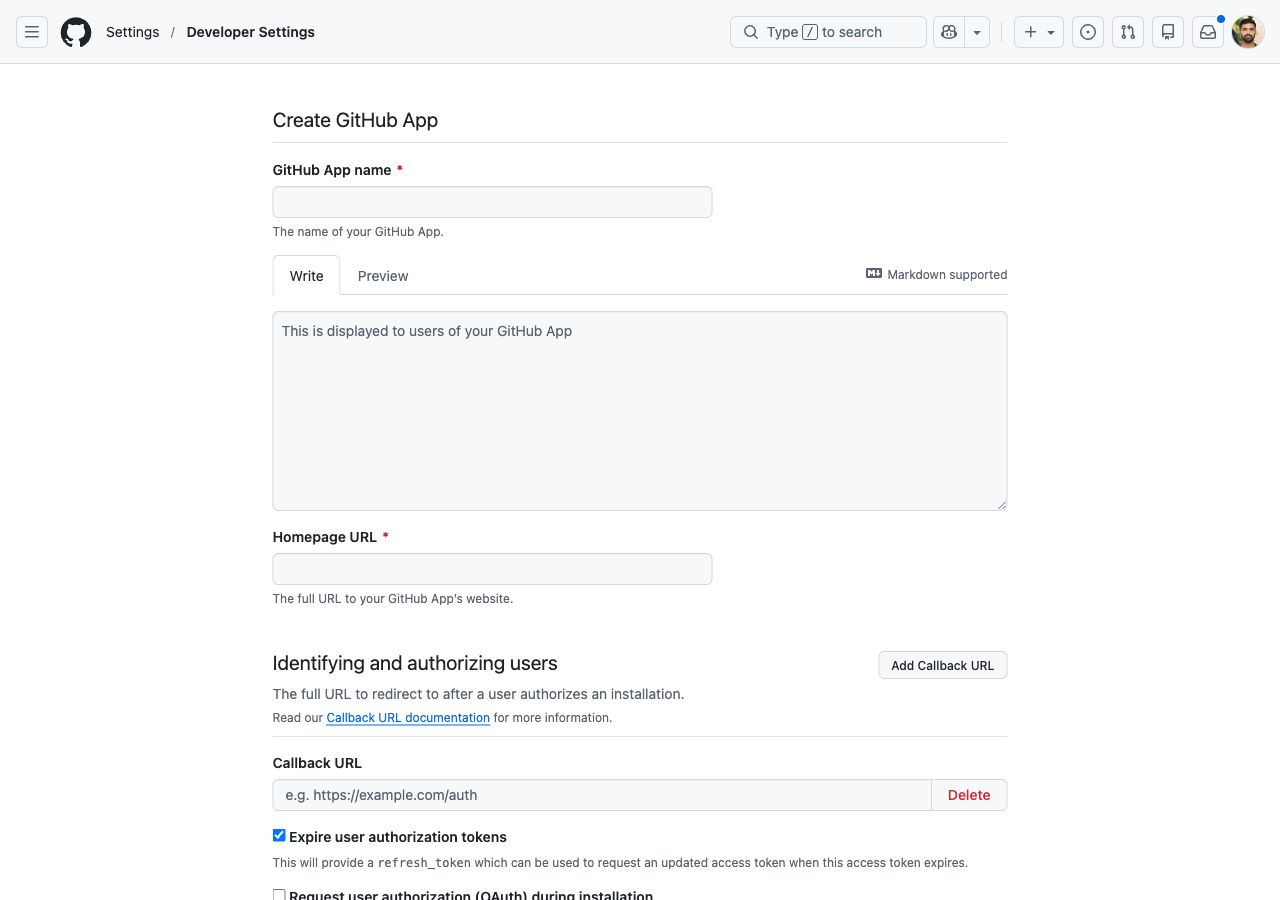
2.1 Open the New App page
Go to GitHub Settings → Developer settings → GitHub Apps → New GitHub App.
Direct link: https://github.com/settings/apps/new
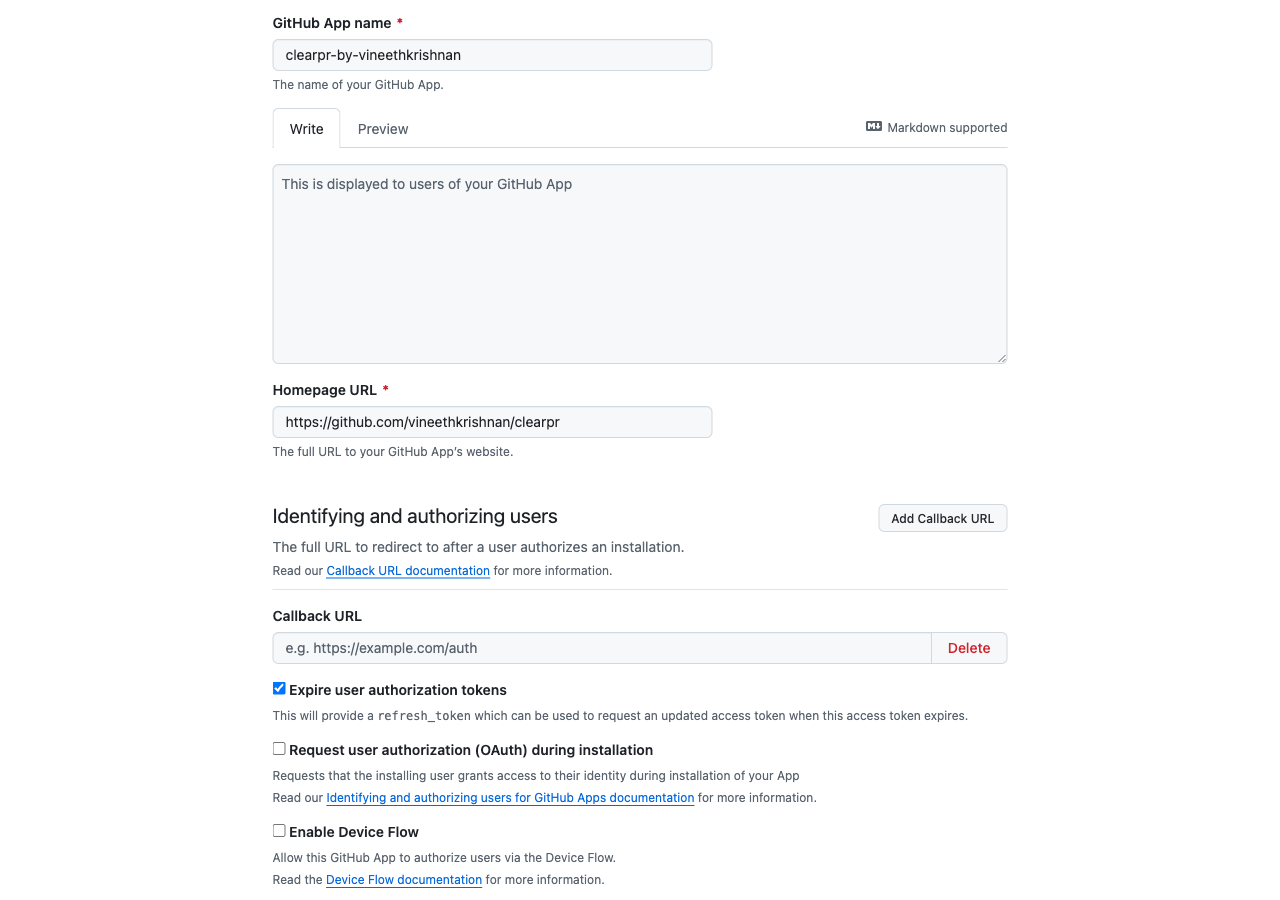
2.2 Fill in the basics
- App name:
clearpr-<your-username>(must be globally unique on GitHub) - Homepage URL:
https://github.com/vineethkrishnan/clearpr(or your fork) - Webhook URL: this depends on whether your ClearPR is reachable from the internet:
- Public server:
https://your-domain.com/webhook - Local laptop: use a smee.io tunnel - see the Local testing with smee.io section below first, then come back
- Public server:
- Webhook secret: click "Generate" or paste a long random string. Copy it now, you'll need it in
.env.
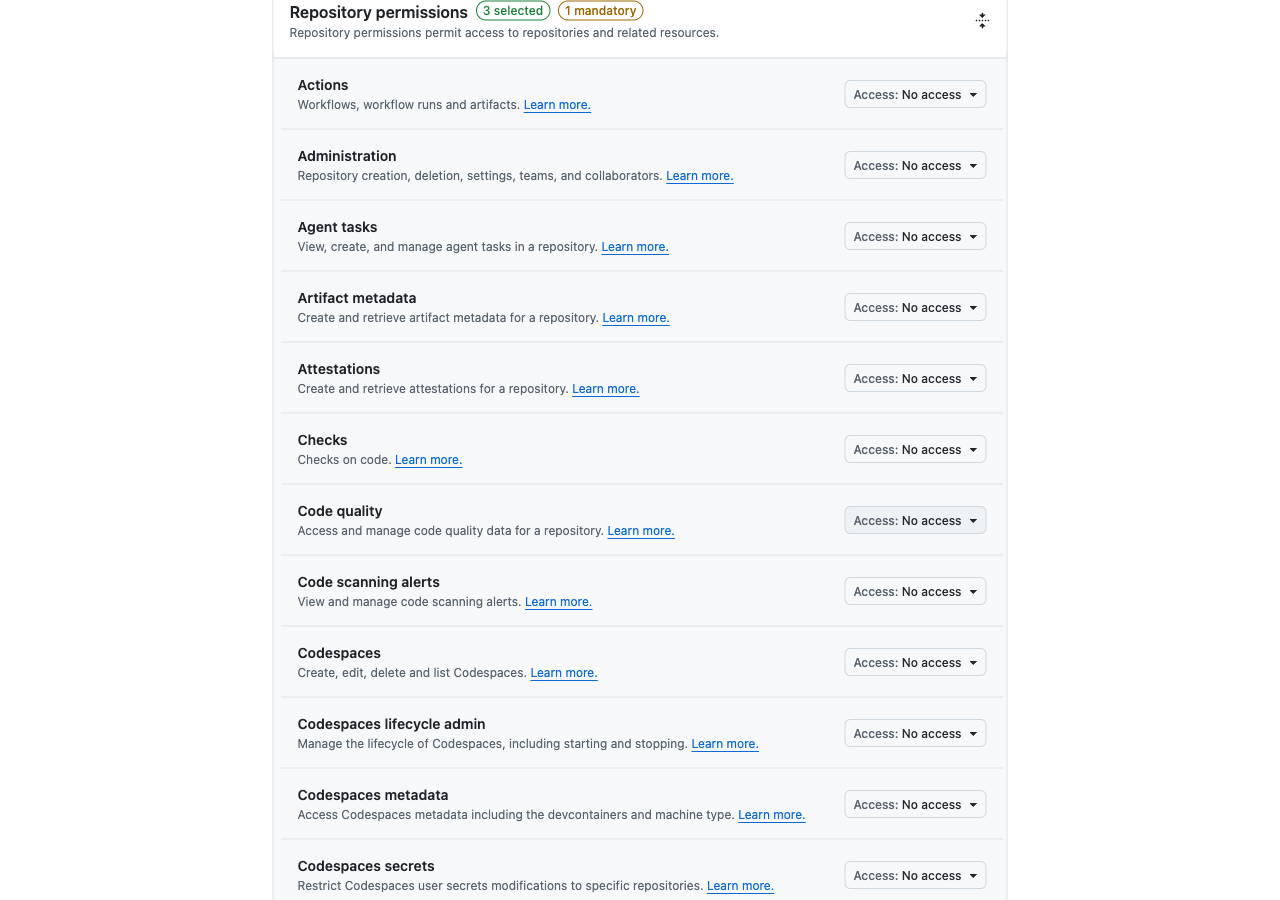
2.3 Set permissions
Scroll down to Repository permissions:
| Permission | Access |
|---|---|
| Pull requests | Read and write |
| Contents | Read-only |
| Metadata | Read-only |
| Issues | Read and write |
| Checks | Read and write |
Issues: write is needed for the :eyes: reaction on @clearpr comments and to edit the in-progress placeholder comment. Checks: write is needed for the "ClearPR review" check that shows in-progress / completed status at the top of the PR.
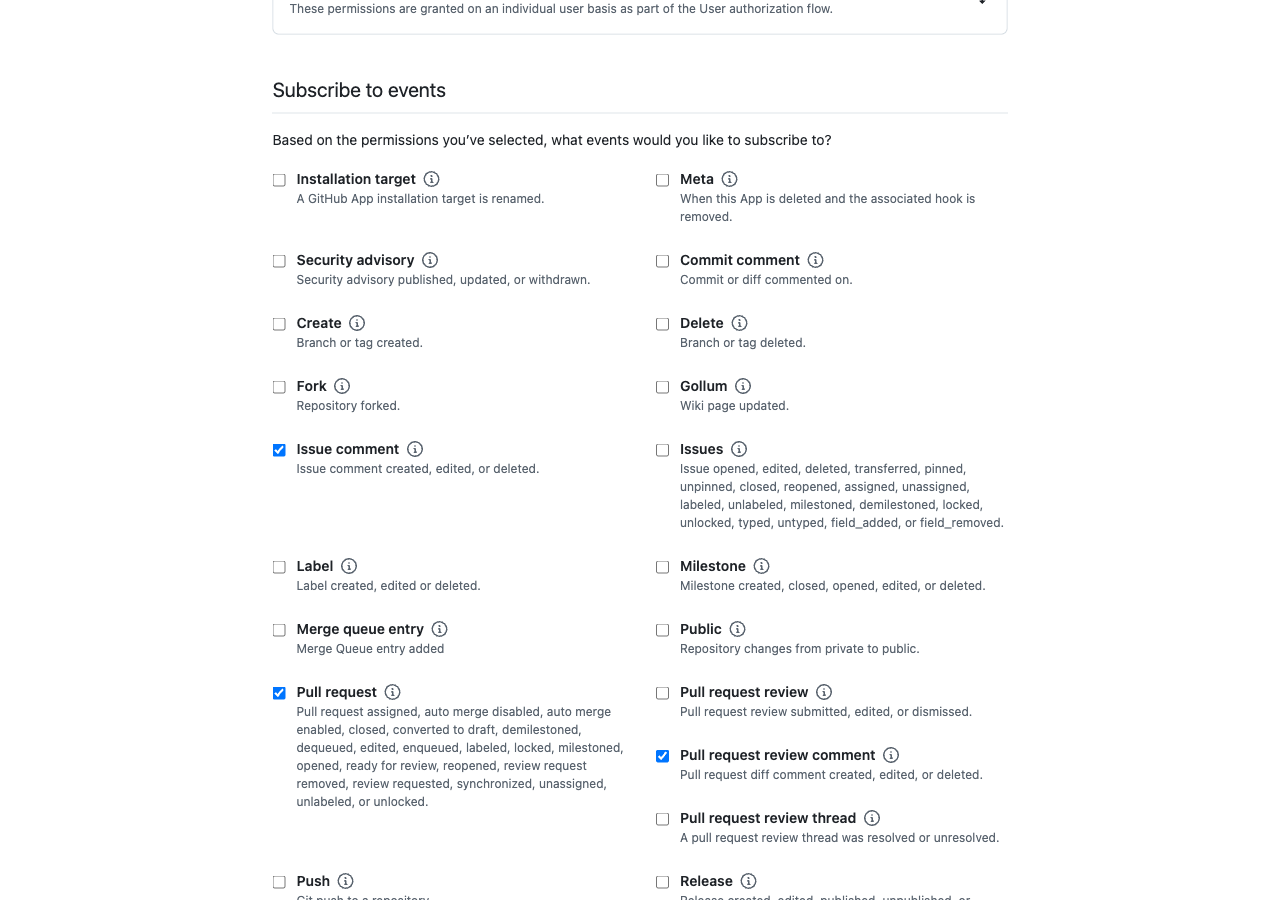
2.4 Subscribe to events
Scroll down to Subscribe to events and check:
- Pull request
- Pull request review comment
- Issue comment
GitHub auto-delivers installation and installation_repositories events to every App, so they're not in the subscribable list. ClearPR handles them when they arrive.
2.5 Where the App can be installed
Under Where can this GitHub App be installed?, choose Only on this account (you can change this later if you want others to use it).
Click Create GitHub App at the bottom.
2.6 Generate the private key
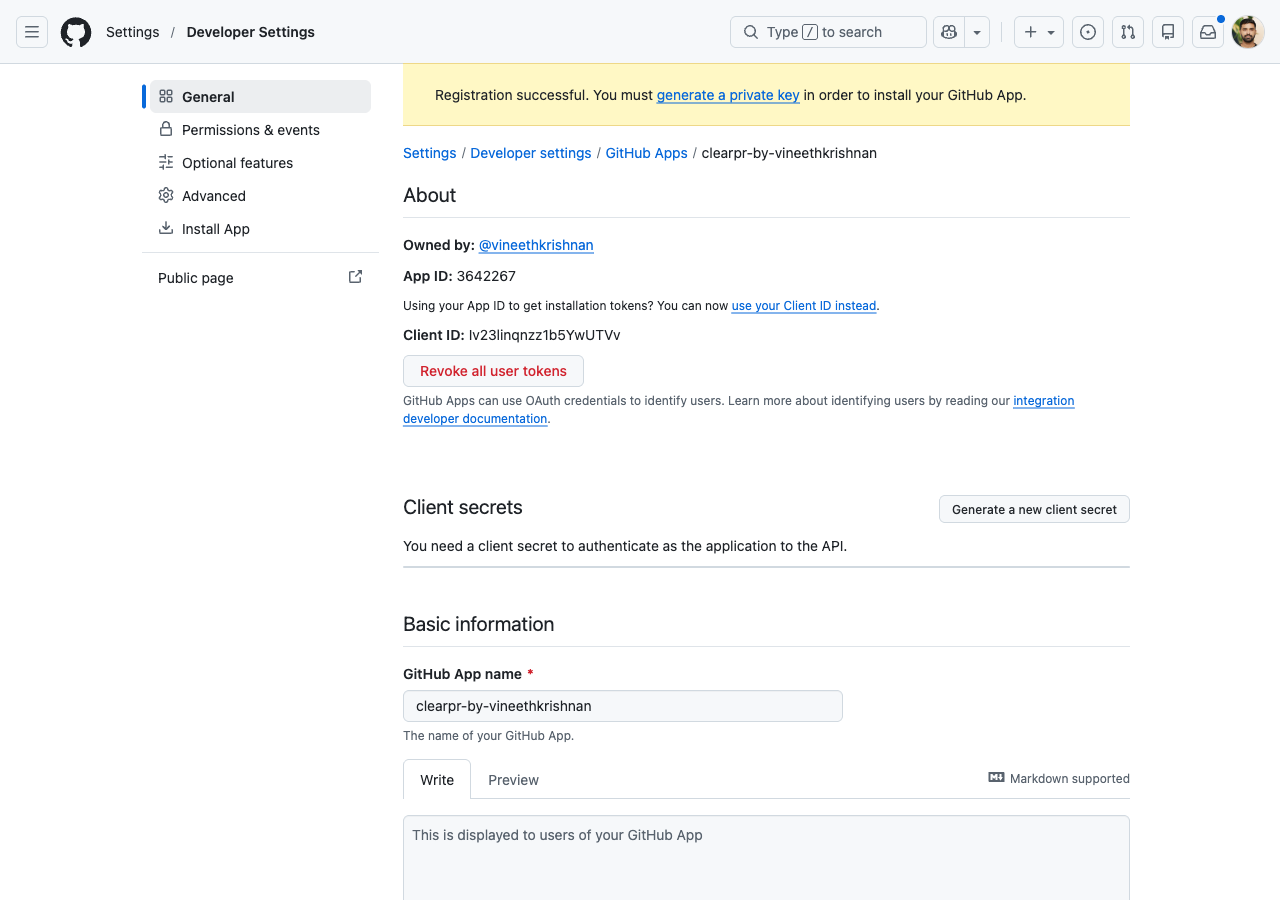
After creation you land on the app's settings page. Two things to grab:
App ID at the top of the page (a 6-7 digit number). Save it.
Scroll to the bottom and click Generate a private key. A
.pemfile downloads. Save the path - you need its contents in.env.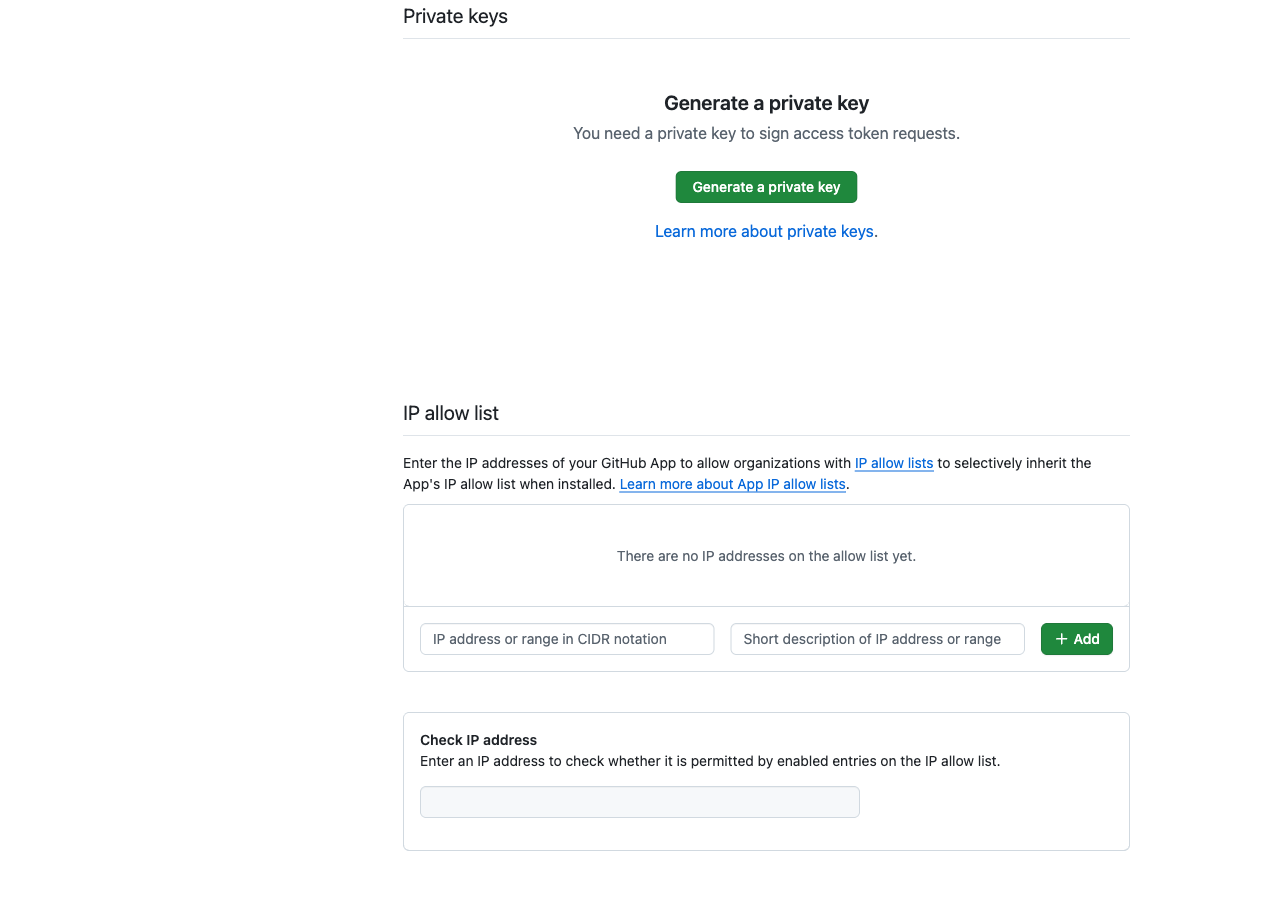
2.7 Update .env
Back in your terminal:
# In the clearpr/ directory
cat >> .env <<EOF
GITHUB_APP_ID=123456
GITHUB_WEBHOOK_SECRET=the-secret-you-set-in-2.2
EOF

# Inject the private key contents
echo "GITHUB_PRIVATE_KEY=\"$(cat ~/Downloads/clearpr-yourname.*.private-key.pem)\"" >> .env
Replace 123456 with your actual App ID and the path with where the .pem actually downloaded.
Step 3: Start ClearPR
docker compose up -d app
docker compose logs app --tail 30
You should see:
[entrypoint] Running TypeORM migrations...
... migration: InitialSchema1712700000000 ...
[entrypoint] Starting application...
[Nest] ... Nest application successfully started
Verify it's healthy:
curl http://localhost:3000/health/live
# {"status":"ok"}

curl http://localhost:3000/health/ready | jq .
# Should show database, redis, queues all "up"
If health/ready shows down for redis or database, check docker compose ps - those services need to be healthy first.
Step 4: Install the App
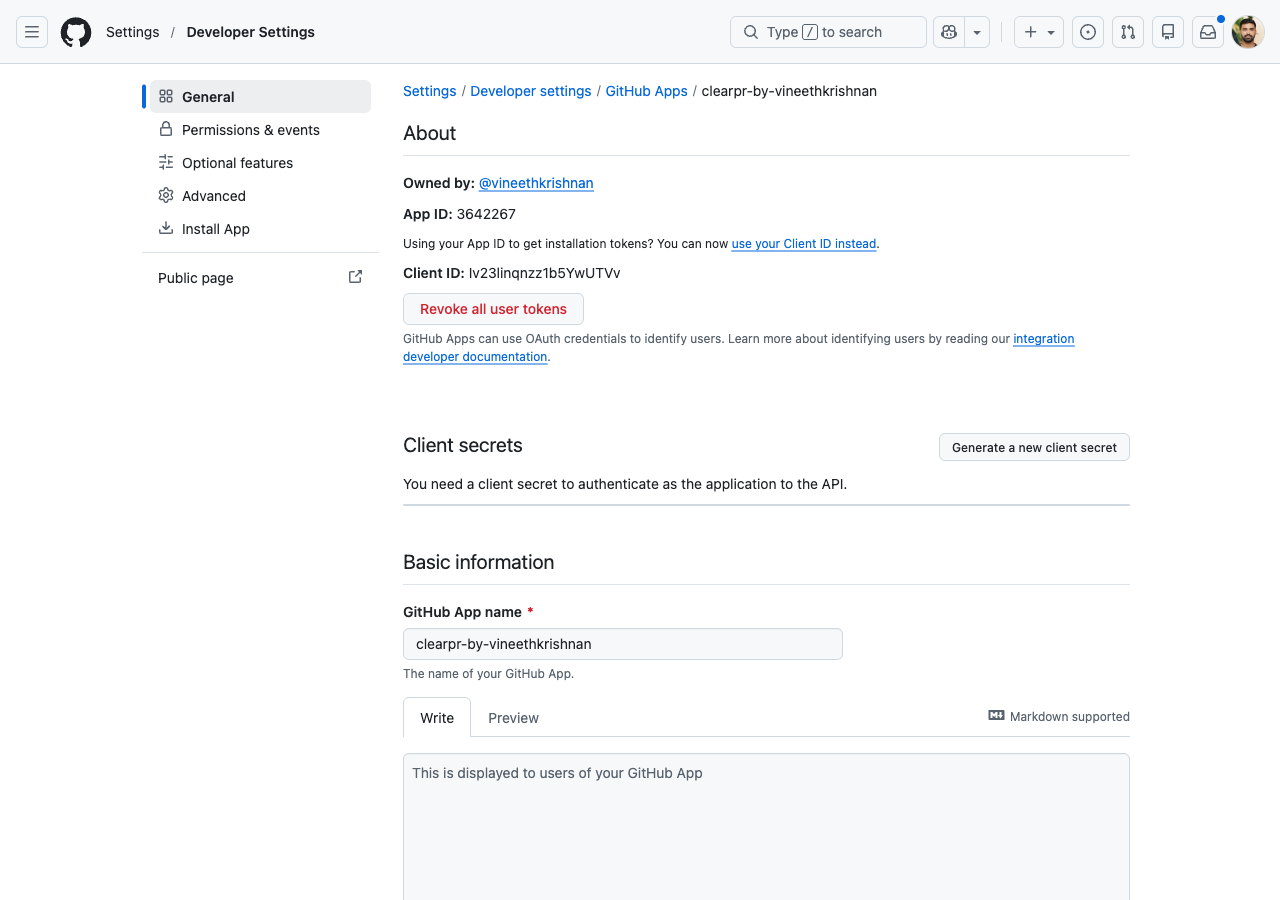
Back on your GitHub App's settings page, click Install App in the left sidebar.
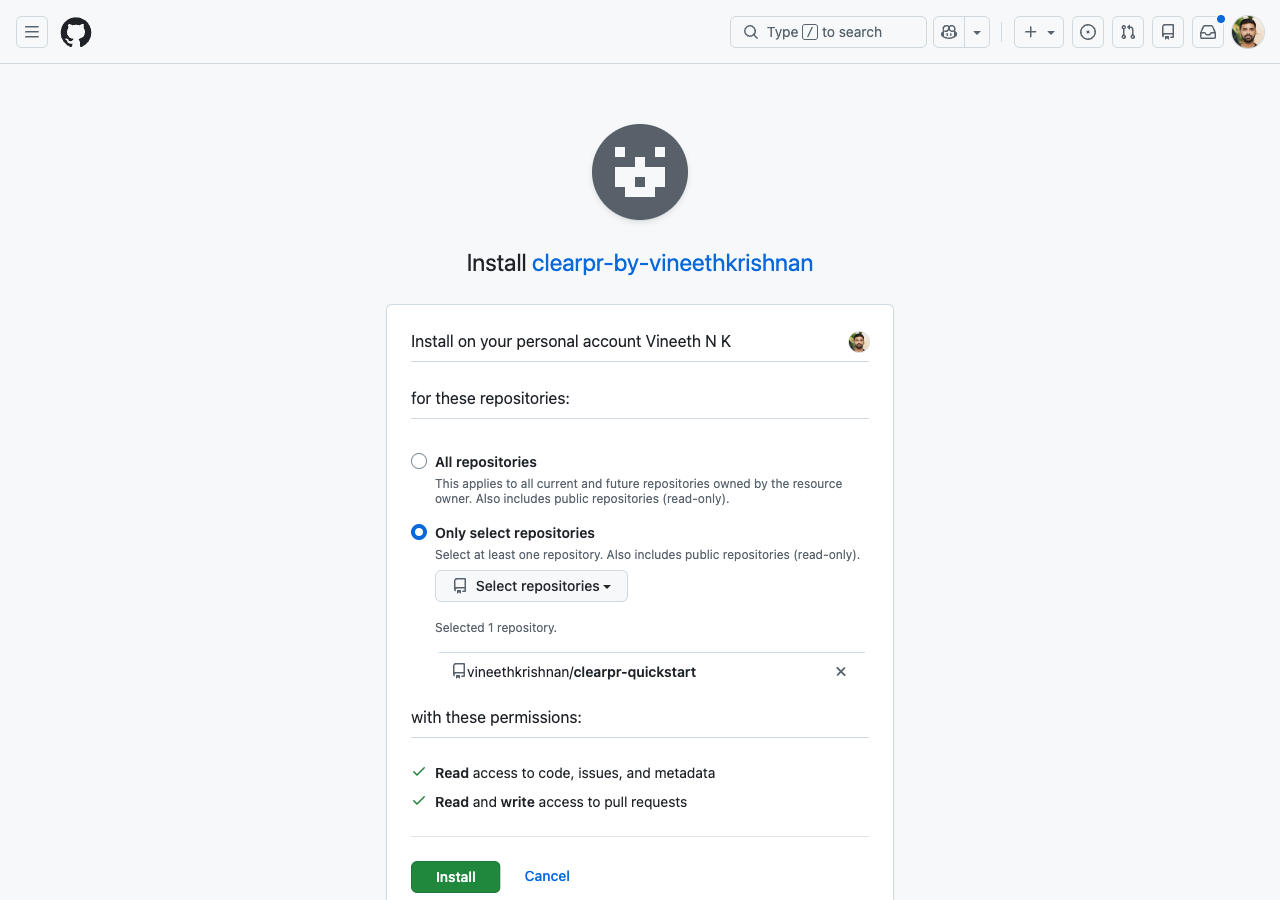
Click Install next to your account, then choose Only select repositories and pick clearpr-quickstart (or any repo you want reviewed). Click Install.
Step 5: Fork the demo repo and open a PR
Fork clearpr-quickstart to your account: https://github.com/vineethkrishnan/clearpr-quickstart/fork
Then locally:
git clone https://github.com/<your-username>/clearpr-quickstart.git
cd clearpr-quickstart
git checkout -b demo-prettier-noise
Make a deliberately noisy change - swap quote style and add semicolons, plus one real behavior change buried in there:
cat > src/discount.ts <<'EOF'
export type Tier = 'bronze' | 'silver' | 'gold';

export function priceAfterDiscount(price: number, tier: Tier): number {
  if (price < 0) return 0;
  switch (tier) {
    case 'bronze': return price * 0.95;
    case 'silver': return price * 0.9;
    case 'gold': return price * 0.75;
  }
}
EOF

git add -A
git commit -m "refactor: tidy discount module"
git push -u origin demo-prettier-noise
Open the PR on GitHub.
What you'll see (in order)
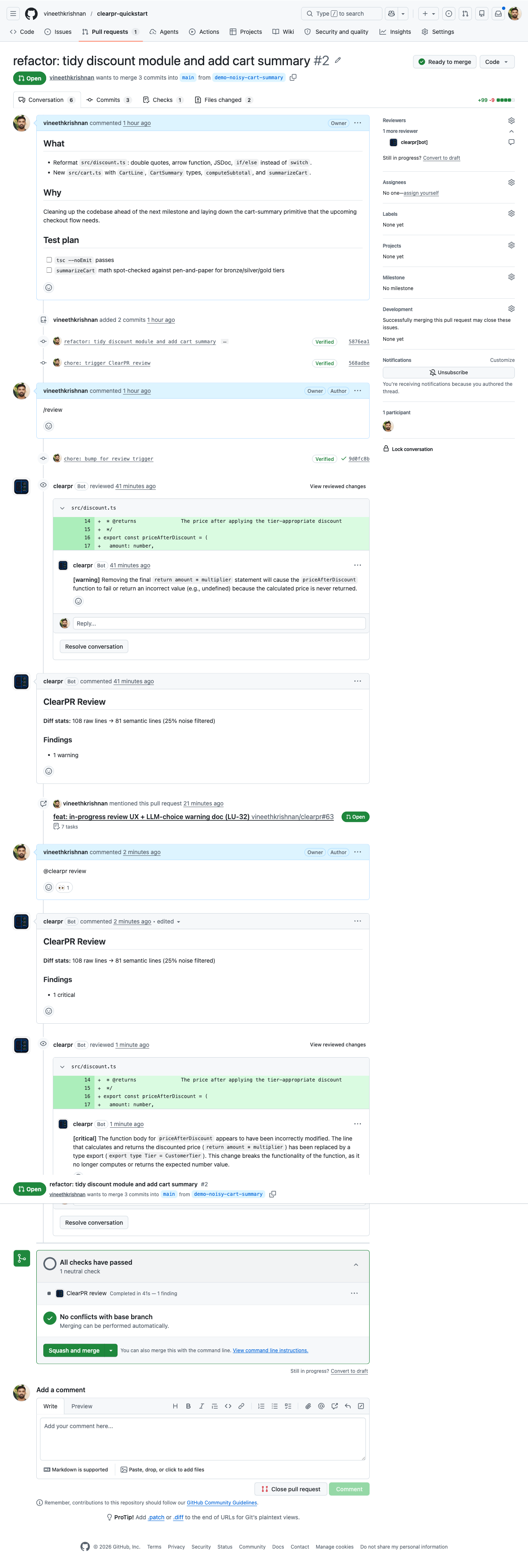
Within the first second of the webhook landing:
- A "ClearPR review" check appears at the top of the PR with status
In progressand a yellow dot. The check links back to the GitHub commit so you can find it later from the Checks tab. - A placeholder comment posts on the PR:
:hourglass_flowing_sand: **ClearPR** is reviewing this PR....
When the LLM call finishes (typically 30-60s with a hosted model, 40-90s with a small local model):
- The placeholder comment is edited in place with the final review summary. GitHub shows an
editedbadge next to the comment timestamp, but no second comment is posted, so the PR conversation stays clean. - Inline findings are posted as a regular GitHub review with line-anchored comments, severity-tagged.
- The check run completes with one of three conclusions:
success(green) - 0 findingsneutral(grey dot) - 1+ findings, or review skipped (e.g., diff too large)failure(red) - the review threw (LLM timeout, parse error, etc.)
If you triggered the run with @clearpr review rather than waiting for the auto-trigger on PR open, the bot first reacts with :eyes: on your comment so you know the command was picked up. Reaction usually shows within 1 second of posting.
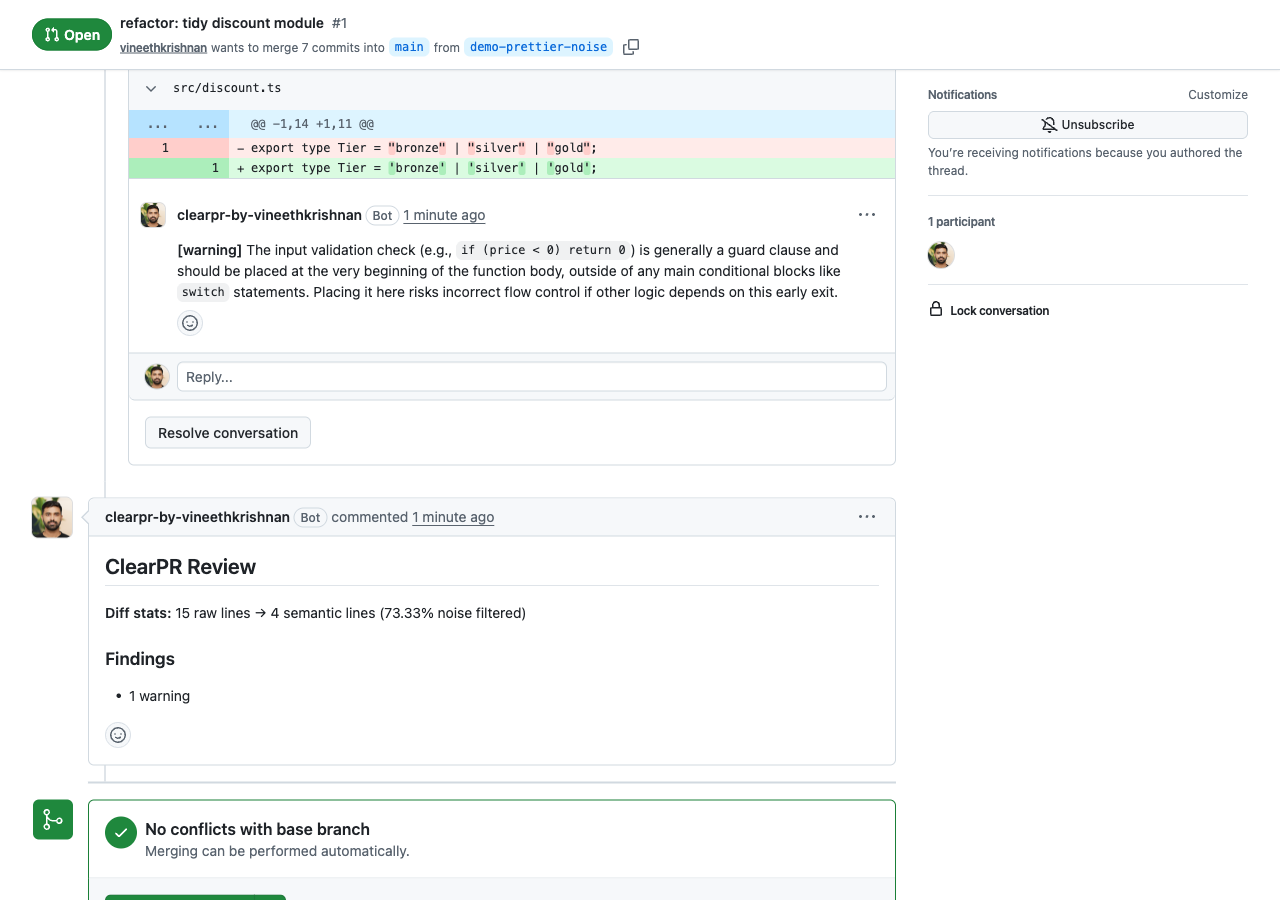
Diff stats
The diff GitHub shows is 8 changed lines (every line of the file changed - quote style + the gold-tier discount went from 0.8 to 0.75 + the <= 0 became < 0).
ClearPR sees the noise (quote style is identical AST), strips it, and tells you the 2 real changes:
golddiscount changed (* 0.8→* 0.75)- The empty-price guard widened (
price <= 0→price < 0, now charges $0 for $0 instead of returning 0)
Using LM Studio or Ollama instead of a paid LLM
Don't have an Anthropic/OpenAI key? Both LM Studio and Ollama expose an OpenAI-compatible API locally and work as drop-in replacements.
LM Studio
- Open LM Studio, load any chat model (a small one like
google/gemma-4-e4borqwen2.5-7b-instructis plenty for review prompts) - Switch to the Developer / Local Server tab and click Start Server (default port 1234)
- In your
.env:envLLM_PROVIDER=openai LLM_BASE_URL=http://host.docker.internal:1234/v1 LLM_MODEL=google/gemma-4-e4b # whatever id LM Studio shows for your model LLM_API_KEY=lm-studio # any non-empty string; LM Studio doesn't validate it docker compose restart app
host.docker.internal is how the app container reaches your Mac's localhost. On Linux Docker, use --add-host=host.docker.internal:host-gateway in your compose config.
Reviews will be slower than a hosted LLM (15-60 seconds per review on a small model) but everything works end-to-end.
Ollama
Same idea:
LLM_PROVIDER=ollama
LLM_BASE_URL=http://host.docker.internal:11434
LLM_MODEL=llama3
No API key needed; Ollama doesn't authenticate.
Local testing with smee.io
If you're running ClearPR on your laptop (not behind a public domain), GitHub can't reach localhost:3000. Use smee.io as a forwarder.
# Get a fresh channel URL
curl -s -o /dev/null -w '%{redirect_url}\n' https://smee.io/new
# -> https://smee.io/aBcDeFgHiJ123

# Forward webhooks to your local server
npx smee-client --url https://smee.io/aBcDeFgHiJ123 --target http://localhost:3000/webhook
Use the https://smee.io/aBcDeFgHiJ123 URL as the webhook URL when creating the GitHub App in Step 2.2. Leave the smee-client running while you test.
Troubleshooting
App container restarts in a loop on first start
With the bundled (plain) db/redis and NODE_ENV=production, ClearPR defaults to requiring TLS and can't connect. Logs show Error: The server does not support SSL connections (Postgres) or ioredis ... ETIMEDOUT (Redis). Add DATABASE_SSL=false and REDIS_TLS=false to .env, then docker compose up -d --force-recreate app.
Reviews/indexing fail with "Not Found" on an installation token
If logs show Failed to index repository: Not Found - .../create-an-installation-access-token-for-an-app, your GITHUB_APP_ID + GITHUB_PRIVATE_KEY are from a different App than the one installed. The webhook still passes (the secret is per-webhook), but ClearPR can't mint a token for that installation. Use the App ID and a private key from the same App whose webhook points at your ClearPR URL. Confirm an App key with a JWT call to GET https://api.github.com/app (the slug tells you which App it is).
health/ready returns 503
Check which subsystem is down:
curl http://localhost:3000/health/ready | jq .database: down: pgvector container isn't ready.docker compose ps dbshould behealthy.redis: down: same for redis.queues: down: more than 100 jobs failed;docker compose logs app --tail 200 | grep -i errorandredis-cli -h localhost LLEN bull:reviews:failedwill show why.
Webhook signature invalid
GITHUB_WEBHOOK_SECRET in .env must match what you set when creating the GitHub App. If you regenerated the secret on GitHub, update .env and docker compose restart app.
Webhook not arriving at all
Check the GitHub App's Advanced tab. Recent deliveries should be listed with a green check or red X. Click into a failing one to see the response. If GitHub got a 5xx, look at docker compose logs app.
"ClearPR review" check stays stuck on In progress
The orchestrator failed mid-run (LLM timeout, parse error) but didn't reach the failure-handling path. Force a re-trigger by pushing an empty commit:
git commit --allow-empty -m "chore: trigger re-review"
git push
The new run will create a fresh check run; GitHub displays the latest one for the head SHA.
Eye reaction never appears on @clearpr comments
Three causes, in order of likelihood:
- GitHub App's
Issuespermission is stillRead-only. Bump it toRead & writeon the App settings page, then accept the new permission on the installation. See GitHub App Setup for the permission table. - Webhook didn't arrive. Check
docker compose logs appforprocess_command-- if absent, see the smee tunnel section above. - Comment didn't start with
@clearpr. The parser strictly requires that prefix; comments like/revieworclearpr revieware silently ignored.
Check run never appears at the top of the PR
The App's Checks permission is missing or set to No access. Set it to Read & write and re-accept on the installation. The pipeline still runs (placeholder + summary still post); only the check is skipped, with a Failed to create check run warning in the app logs.
Webhook arrives but ClearPR says it doesn't know the repo
If you installed the App before the smee tunnel (or your public domain) was reachable, the installation.created event was sent into the void, and ClearPR's database has no record of your installation. Subsequent PR webhooks succeed at HMAC + dispatch but the per-action use cases bail out because repository_repo.findByGithubId(...) returns null.
Fix: replay the missed delivery.
- Go to your GitHub App's Advanced tab:
https://github.com/settings/apps/<your-app>/advanced - Find the
installation.createddelivery in Recent deliveries - Click into it, then click Redeliver
ClearPR receives it, registers the installation, and triggers a bulk index of past PR comments. Re-fire the PR webhook (or push another commit) and the review will run.
Review never appears
Walk the pipeline:
# Did the webhook arrive?
docker compose logs app | grep "Webhook dispatched"

# Was a job enqueued?
redis-cli -h localhost LLEN bull:reviews:waiting

# Was it processed?
docker compose logs app | grep "Review completed"
If the LLM call fails, you'll see it in the logs - usually a missing or wrong API key.
Next steps
- Choose a different LLM provider
- Configure project guidelines so ClearPR reviews against your team's rules
- Use PR commands to trigger manual reviews or change behavior per-PR
- Production deployment for going beyond local testing